
Blame
|
1 | # Customization |
||||||
| 2 | ||||||||
|
3 | ## How to customize your wiki |
||||||
|
4 | |||||||
|
5 | An Otter Wiki was not designed with the idea that user-defined styles and code might become necessary. However, since there is a need, a way to add CSS, JS and HTML has been added. |
||||||
|
6 | |||||||
|
7 | There are currently two ways to customize the wiki: |
||||||
| 8 | - Using `custom` directory to be able to add custom CSS, JS and HTML |
|||||||
| 9 | - Using env variables for small HTML tweaks |
|||||||
| 10 | ||||||||
| 11 | Both methods work independently of each other. |
|||||||
|
12 | |||||||
|
13 | ### Using `custom` Directory |
||||||
|
14 | |||||||
|
15 | The template automatically loads several custom files which are empty by default. You can mount a directory into the container to provide the following customizations: |
||||||
| 16 | - `custom.css` - custom CSS styles (from version **2.3.1**) |
|||||||
| 17 | - `custom.js` - custom JavaScript (from version **2.3.1**) |
|||||||
| 18 | - `customHead.html` - custom HTML injected into the `<head>` section (from version **2.15.0**) |
|||||||
| 19 | - `customBody.html` - custom HTML injected into the `<body>` section (from version **2.15.0**) |
|||||||
|
20 | |||||||
|
21 | For example, with a `docker-compose.yaml` like this: |
||||||
|
22 | ```yaml |
||||||
| 23 | services: |
|||||||
| 24 | otterwiki: |
|||||||
| 25 | image: redimp/otterwiki:2 |
|||||||
| 26 | restart: unless-stopped |
|||||||
| 27 | ports: |
|||||||
| 28 | - 8080:80 |
|||||||
| 29 | volumes: |
|||||||
| 30 | - ./app-data:/app-data |
|||||||
|
31 | # a custom local directory with a custom.css, custom.js, customHead.html and customBody.html |
||||||
|
32 | - ./custom:/app/otterwiki/static/custom |
||||||
| 33 | ``` |
|||||||
| 34 | ||||||||
|
35 | > [!NOTE] |
||||||
| 36 | > In case of a local deployment the browser might cache the web app, so users are recommended to clear cookies and site data if the changes to `custom.js` or `custom.css` are not visible immediately even after restarting the docker |
|||||||
| 37 | ||||||||
| 38 | ### Using Environment Variables to Tweak HTML |
|||||||
| 39 | ||||||||
| 40 | The HTML body and head of every html rendered can be tweaked via `HTML_EXTRA_HEAD` and `HTML_EXTRA_BODY` environment variables. |
|||||||
| 41 | ||||||||
| 42 | This can be used for small tweaks that don't require big amounts of code. |
|||||||
| 43 | ||||||||
|
44 | |||||||
|
45 | ## Examples |
||||||
|
46 | |||||||
|
47 | If you've made improvements that you'd like to share, don't forget, pull requests are always welcome. Or upon up an [issue](https://github.com/redimp/otterwiki/issues) post your code and a screenshot. |
||||||
| 48 | ||||||||
| 49 | Check [otterwiki/docs/custom_css_example](https://github.com/redimp/otterwiki/tree/main/docs/custom_css_example) on github for ready-to-test examples. |
|||||||
| 50 | ||||||||
| 51 | ### Serif Pages |
|||||||
| 52 | ||||||||
| 53 | This is an example `custom.css` that uses the serif font |
|||||||
|
54 | `Baskervville` for the content rendered in the page. |
||||||
| 55 | ||||||||
| 56 | ```css |
|||||||
| 57 | @import url('https://fonts.googleapis.com/css2?family=Baskervville'); |
|||||||
| 58 | ||||||||
| 59 | .content > .page { |
|||||||
| 60 | font-family: 'Baskervville', serif; |
|||||||
| 61 | font-weight: 400; |
|||||||
| 62 | } |
|||||||
| 63 | ``` |
|||||||
| 64 | ||||||||
|
65 | 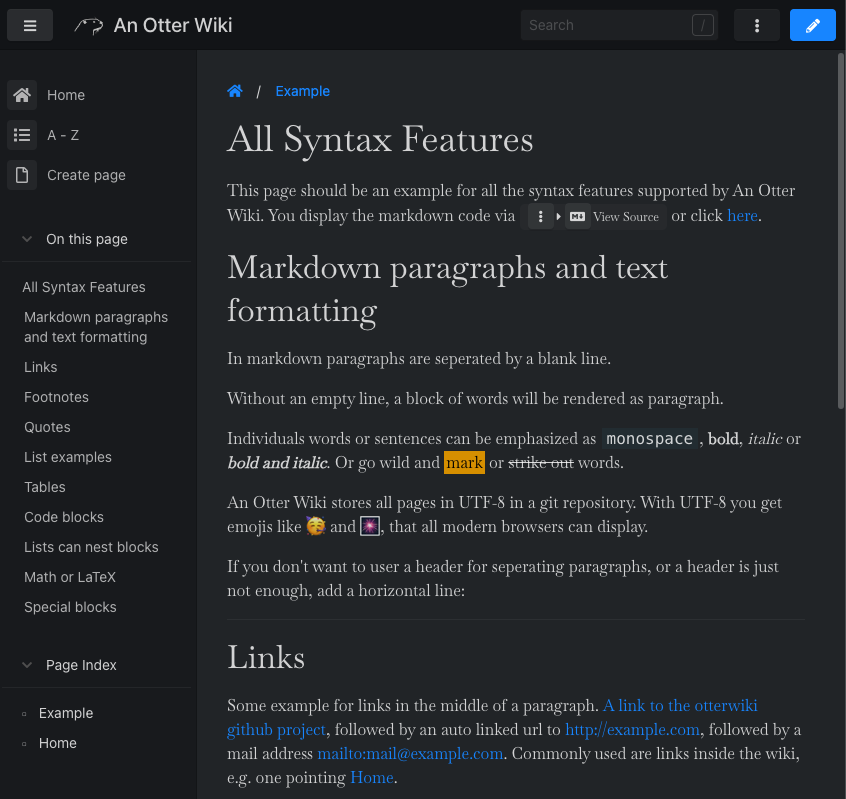 |
||||||
|
66 | |||||||
|
67 | ### Adding the "Fork me on github" ribbon |
||||||
|
68 | |||||||
|
69 | This is an example of adding the "Fork me on github" ribbon using env variables for custom HTML. |
||||||
|
70 | |||||||
| 71 | ```yaml |
|||||||
| 72 | services: |
|||||||
| 73 | otterwiki: |
|||||||
| 74 | image: redimp/otterwiki:2 |
|||||||
| 75 | restart: unless-stopped |
|||||||
| 76 | ports: |
|||||||
| 77 | - 8080:80 |
|||||||
| 78 | environment: |
|||||||
| 79 | HTML_EXTRA_HEAD: <link rel="stylesheet" href="https://cdnjs.cloudflare.com/ajax/libs/github-fork-ribbon-css/0.2.3/gh-fork-ribbon.min.css" /> |
|||||||
| 80 | HTML_EXTRA_BODY: <a class="github-fork-ribbon right-bottom" href="https://url.to-your.repo" data-ribbon="Fork me on GitHub" title="Fork me on GitHub">Fork me on GitHub</a> |
|||||||
| 81 | volumes: |
|||||||
| 82 | - ./app-data:/app-data |
|||||||
| 83 | ``` |
|||||||
| 84 | ||||||||
| 85 | 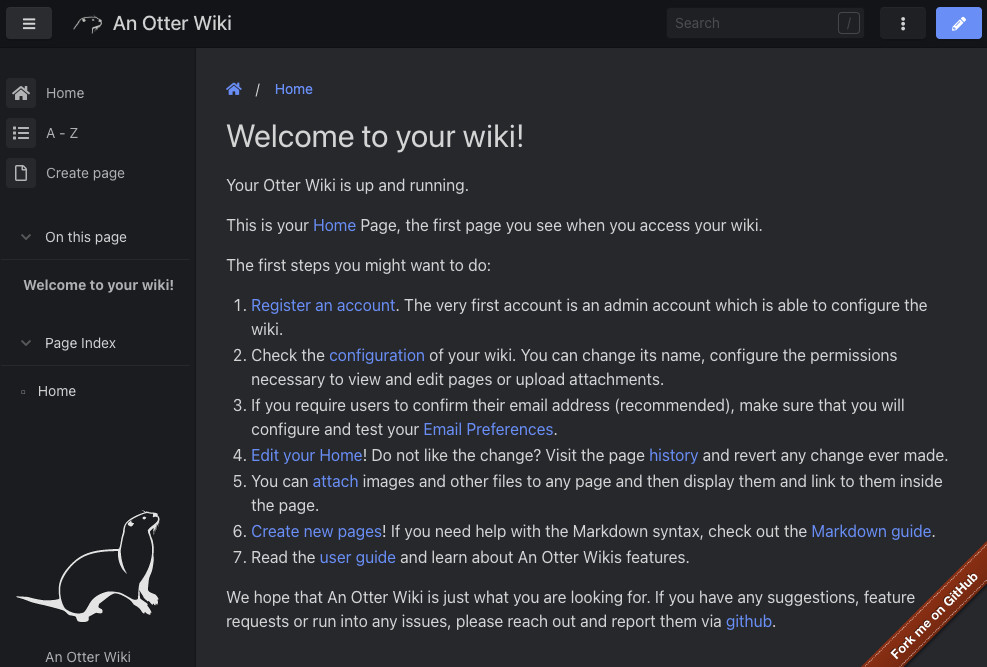 |
|||||||
|
86 | |||||||
|
87 | ### Custom Fancy Block Styles |
||||||
| 88 | ||||||||
| 89 | If a non-standard style name is used for a Fancy Block, it will be rendered with the class `alert-[style name]`. This allows you to define your own styles in `custom.css`. |
|||||||
| 90 | ||||||||
| 91 | ```md |
|||||||
| 92 | ::: extradanger |
|||||||
| 93 | ## Watch Out! |
|||||||
| 94 | ||||||||
| 95 | This Fancy Block has custom styles |
|||||||
| 96 | ::: |
|||||||
| 97 | ``` |
|||||||
| 98 | ||||||||
| 99 | You will likely need to add styles for both light and dark modes, since the dark mode styles for the base alert will override your styles for light mode. |
|||||||
| 100 | ||||||||
| 101 | ```css |
|||||||
| 102 | .alert-extradanger { |
|||||||
| 103 | background-color: yellow; |
|||||||
| 104 | border: 5px dashed black; |
|||||||
| 105 | border-radius: 0; |
|||||||
| 106 | } |
|||||||
| 107 | ||||||||
| 108 | .dark-mode .alert-extradanger { |
|||||||
| 109 | background-color: #666600; |
|||||||
| 110 | border: 5px dashed yellow; |
|||||||
| 111 | border-radius: 0; |
|||||||
| 112 | } |
|||||||
| 113 | ``` |
|||||||
| 114 | ||||||||
|
115 | 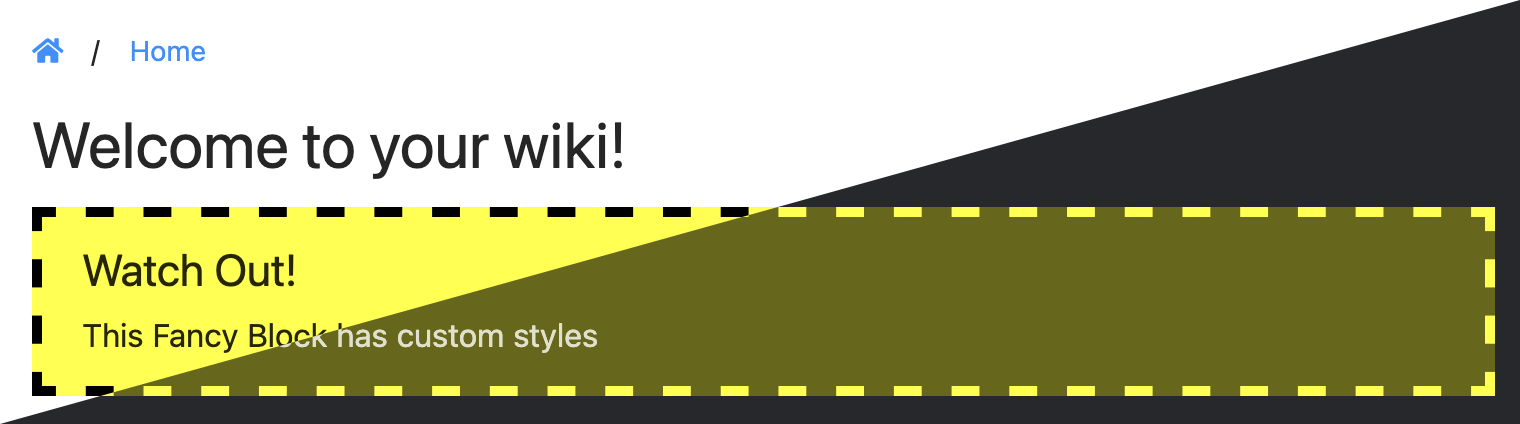 |
||||||
|
116 | |||||||
| 117 | ### Styling individual pages or categories |
|||||||
|
118 | |||||||
| 119 | A data attribute set to the path is set on the `<body>` of each page (`data-page-path`) and index (`data-index-path`) to allow styling or JavaScript functionality on individual pages. |
|||||||
| 120 | ||||||||
| 121 | The path is turned into a slug in each section, for example _My Category/My Page_ becomes `my-category/my-page`. |
|||||||
| 122 | ||||||||
| 123 | These are some examples of potential style customisations: |
|||||||
| 124 | ||||||||
|
125 | #### Target a Specific Page |
||||||
|
126 | |||||||
|
127 | Hides the sidebar on the homepage only |
||||||
|
128 | |||||||
| 129 | ```css |
|||||||
| 130 | body[data-page-path="home"] .extra-nav { |
|||||||
| 131 | display: none; |
|||||||
| 132 | } |
|||||||
| 133 | ``` |
|||||||
| 134 | ||||||||
|
135 | #### Style all pages in a category |
||||||
|
136 | |||||||
| 137 | Applies a different colour to pages in _My Category_. |
|||||||
| 138 | ||||||||
| 139 | ```css |
|||||||
| 140 | body[data-page-path^="my-category/"] h1 { |
|||||||
| 141 | color: darkred; |
|||||||
| 142 | font-weight: bold; |
|||||||
| 143 | } |
|||||||
| 144 | ``` |
|||||||
| 145 | ||||||||
|
146 | #### Style a Category Index |
||||||
|
147 | |||||||
|
148 | > [!NOTE] |
||||||
| 149 | > The whole wiki page index has a `data-index-path` of `/` |
|||||||
| 150 | ||||||||
| 151 | Turns the index listing into a one-column list for _My Category_. |
|||||||
|
152 | |||||||
| 153 | ```css |
|||||||
| 154 | /* body[data-index-path^="my-category/"] |
|||||||
| 155 | to apply to subcategories as well*/ |
|||||||
| 156 | body[data-index-path="my-category"] .pageindex-columns { |
|||||||
| 157 | columns: 1 |
|||||||
| 158 | } |
|||||||
|
159 | ``` |
||||||